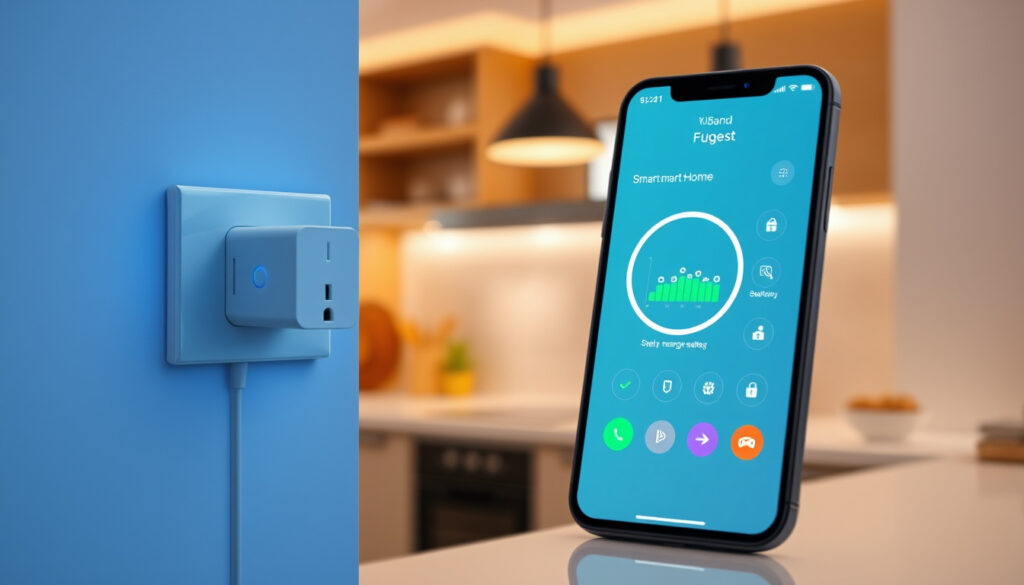
What Is a Smart Plug – Guide to Setup, Safety and Savings
A smart plug transforms any ordinary electrical outlet into a hub for remote-controlled appliances. These compact devices connect to your home network, enabling smartphone apps, voice commands, or automated schedules to manage lamps, coffee makers, entertainment systems, and dozens of other devices. The technology has matured rapidly since the early 2010s, with modern plugs now offering energy monitoring, Matter protocol compatibility, and seamless integration with Amazon Alexa, Google Home, and Apple HomeKit ecosystems.
For households building their first automation setup or veterans expanding an existing system, smart plugs represent one of the most accessible entry points. Unlike hardwired smart switches that require electrical work, these outlet adapters install in seconds without professional help. The convenience factor alone justifies the investment for many users: turning on the coffee maker from bed, verifying an iron is off while commuting to work, or scripting lights to simulate occupancy during a vacation. Beyond convenience, the best smart plugs contribute measurable energy savings by eliminating phantom power drain and enforcing schedules that prevent appliances from running unnecessarily.
This guide examines how smart plugs function, which safety considerations matter most, and whether the projected energy savings justify the hardware investment for your specific situation.
What Is a Smart Plug?
A smart plug is a wireless-enabled device that slots into a standard electrical outlet and allows you to control anything plugged into it remotely. Rather than replacing your wall socket, these adapters act as intermediaries between the outlet and your appliance, adding network connectivity and app-based management to otherwise ordinary devices.
Overview: Definition and Key Capabilities
A wireless adapter that slots into a standard outlet, enabling remote control of any connected device via app, voice, or schedule.
Remote on/off control, scheduling, energy monitoring, Away Mode for security, and voice assistant integration.
Wi-Fi (2.4GHz) for direct router connection, Zigbee or Z-Wave requiring a hub, and Matter for cross-platform compatibility.
Amazon Alexa, Google Assistant, Apple HomeKit, Samsung SmartThings, and emerging Thread/Matter networks.
Key Insights
- Smart plugs consume roughly 1 watt in standby mode and 1-2 watts when actively connected to Wi-Fi, making their operational cost negligible.
- Scheduling appliances to run only during off-peak hours can reduce energy waste from devices left running accidentally.
- The Matter protocol represents the 2024 industry standard for cross-manufacturer device compatibility, eliminating ecosystem lock-in.
- Models with energy monitoring provide real-time wattage data, helping identify appliances responsible for unexpectedly high electricity bills.
- High-power devices exceeding 2,300 watts—including space heaters, air conditioners, and medical equipment—should never connect to smart plugs.
- Away Mode features allow lights or radios to activate on randomized schedules, creating convincing occupancy illusions for burglary deterrence.
Quick Reference: Smart Plug Specifications
| Specification | Typical Value | Example Models |
|---|---|---|
| Power Rating | 10–15 Amps (1,100–1,650W at 110V) | TP-Link Kasa, Gosund, Meross |
| Connectivity | Wi-Fi 2.4GHz (most common) | Wemo, Amazon Smart Plug |
| Hub Requirement | Optional (varies by protocol) | Philips Hue (Zigbee) vs. Kasa (standalone) |
| Voltage Compatibility | 110–120V (North America) or 220–240V (Europe/Asia) | Verify before purchase for international use |
| Energy Monitoring | Built-in on mid-range and premium models | Eve Energy, TP-Link Kasa EP10 |
| Matter Support | Newer models (2023 onward) | TP-Link Tapo, Aqara |
| Physical Design | Compact (does not block adjacent outlets) | Varies; check dimensions before purchase |
Smart plugs purchased in North America operate on 110–120V circuits and will not function correctly—or may sustain damage—on 220–240V systems used in Europe, Asia, and other regions. Always verify voltage compatibility before international shipping or travel.
How Does a Smart Plug Work?
Understanding the operational chain clarifies why smart plugs perform so differently across brands and ecosystems. The process begins the moment you insert the adapter into your wall socket.
The Four-Step Connection Process
First, the physical connection: the smart plug inserts into a standard electrical outlet, and your appliance plugs into the smart plug rather than directly into the wall. This positioning allows the adapter to interrupt or allow current flow based on commands it receives.
Second, network pairing involves downloading the manufacturer’s proprietary app, creating an account if required, and guiding the plug to discover your home network. Most Wi-Fi smart plugs operate exclusively on 2.4GHz frequencies—even if your router broadcasts 5GHz—because 2.4GHz provides superior wall penetration and range for IoT devices.
Third, after successful pairing, the plug registers with the manufacturer’s cloud servers, enabling remote access from anywhere with internet connectivity. Some models bypass cloud dependency entirely through local hub integration, offering faster response times and continued operation during internet outages.
Fourth, control options expand to include smartphone apps, voice assistants, web dashboards, and automation rules within platforms like IFTTT, Samsung SmartThings, or the native ecosystem apps.
Communication Protocols Compared
The protocol a smart plug uses determines setup complexity, hub requirements, and long-term ecosystem viability.
If you already own an Amazon Echo with built-in Zigbee, a Philips Hue Hub, or a Samsung SmartThings hub, look for smart plugs that support your existing infrastructure. Standalone Wi-Fi plugs offer simpler initial setup but create dependency on manufacturer cloud services.
| Protocol | Hub Required | Range | Ecosystem Flexibility | Best For |
|---|---|---|---|---|
| Wi-Fi (2.4GHz) | No | Limited by router coverage | Moderate (proprietary apps) | Single-room or Wi-Fi-rich homes |
| Zigbee | Yes (Echo, Hue, SmartThings) | Mesh extendable (30m+) | High (hub-agnostic) | Larger homes, multi-device setups |
| Z-Wave | Yes | Mesh extendable (40m+) | High (hub-agnostic) | Professional installations |
| Matter (over Thread/Wi-Fi) | Optional | Thread mesh or Wi-Fi range | Very high (cross-platform) | Future-proofing, multi-ecosystem homes |
Are Smart Plugs Safe to Use?
Smart plugs undergo the same electrical safety testing as conventional outlets when manufactured by reputable brands. However, user behavior and network hygiene significantly influence real-world safety outcomes.
Built-in Protective Features
Quality smart plugs incorporate flame-retardant housing materials, overload protection circuits that disengage when power draw exceeds approximately 2,300 watts, and insulated internal components designed to prevent electric shock during normal operation. These specifications mirror the protective measures built into standard wall receptacles.
The CISA (Cybersecurity and Infrastructure Security Agency) publishes IoT security guidelines that many manufacturers now reference during development, though compliance remains voluntary in most jurisdictions.
Safety Best Practices
- Avoid high-power appliances: Never connect space heaters, air conditioners, washing machines, or medical equipment to smart plugs. These devices exceed typical power limits and create fire hazards when cycled remotely.
- Moisture exposure: Keep smart plugs dry. Bathrooms, kitchens, and outdoor locations without weather-rated enclosures pose corrosion and short-circuit risks.
- Verify certification: Look for ETL, UL, or CE marks indicating independent safety testing. Plug-in analyzers can confirm whether a device meets stated electrical standards.
- Secure your network: WPA3 or WPA2 encryption with a strong, unique router password prevents unauthorized access to smart plugs and other IoT devices.
- Isolate USB ports: Some smart plugs include USB charging ports. If these are not galvanically isolated from mains voltage, they can damage connected devices or cause shock. Purchase only from brands that explicitly confirm isolation compliance.
- Professional socket replacement: Fixed smart outlets installed in place of standard receptacles require a registered electrician. Attempting this without qualified expertise violates electrical codes in most regions.
Shared account access creates risk in situations involving domestic abuse or stalking. Refuge Tech Safety resources recommend removing shared device accounts and performing factory resets on smart plugs when relationship safety becomes a concern. Only download companion apps from official app stores to avoid malware disguised as utility software.
How Do I Set Up and Use a Smart Plug?
The setup process typically requires under ten minutes for users comfortable with smartphone apps and home networks. Compatibility with voice assistants adds another five minutes but remains optional.
Initial Setup Steps
Begin by selecting a central outlet location—not behind furniture where wireless signals weaken—and inserting the smart plug with the indicator light facing outward for visibility. Download the manufacturer’s app from the Apple App Store or Google Play Store; avoid third-party app sources to prevent credential-stealing malware.
After creating an account and logging in, the app guides you through network discovery. Most manufacturers require you to temporarily disconnect your phone from 5GHz networks if dual-band routers are configured, as initial pairing broadcasts on 2.4GHz. Enter your Wi-Fi password when prompted, wait 30–60 seconds for confirmation, and rename the device (for example, “Living Room Lamp” or “Coffee Maker”) to simplify voice commands and automation rules.
Voice Assistant Integration
After completing app-based setup, linking your smart plug to Amazon Alexa, Google Assistant, or Apple HomeKit unlocks hands-free operation. Each ecosystem provides branded skill or plugin directories within their apps—search for your plug manufacturer’s name, authorize the connection, and wait for discovered devices to appear.
Voice commands then follow natural patterns: “Alexa, turn off the bedroom lamp,” “Hey Google, is the coffee maker on?” or “Siri, set the living room to 50%.” The Aqara smart plug documentation confirms that multi-step routines—like morning sequences that activate the kettle, turn on bedroom lights gradually, and start the news stream—require configuration within the native ecosystem app rather than individual device settings.
Scheduling and Automation
Within the companion app, timers control on/off cycles at specific times or on recurring schedules. Away Mode randomizes these intervals to prevent predictability, while IFTTT integration enables conditional logic: motion detected by a camera triggers a lamp to illuminate, or sunset triggers porch lights to activate automatically.
Do Smart Plugs Save Energy and Are They Worth It?
The energy-saving potential depends on your usage patterns, which appliances you control, and whether your chosen model includes monitoring capabilities.
Quantifying the Savings
Energy monitoring plugs like the Eve Energy or TP-Link Kasa EP10 display real-time wattage, allowing you to identify phantom drain. A television consumed 12 watts while “off”—common for smart TVs with instant-on features. A coffee maker drew 5 watts continuously awaiting voice activation. Aggregating these figures across dozens of devices reveals meaningful baseline waste that automation eliminates.
Scheduling enforcement provides the clearest financial return. Devices set to shut down at 11 PM or activate only during work hours prevent accidental all-day consumption. The ADT smart plug guide estimates that eliminating phantom power and enforcing schedules can reduce related electricity costs by 5–10% for households with significant standby loads.
When Smart Plugs Deliver Maximum Value
- Controlling devices in difficult-to-access locations (high shelves, behind furniture, utility closets)
- Managing entertainment centers with multiple components that compound standby drain
- Verifying remotely that high-risk appliances (irons, hair straighteners) are powered off
- Automating holiday lighting without manual timer adjustments
- Creating occupancy simulation for extended absences
At an average retail price of £15–30 per plug, the hardware investment rarely pays for itself through energy savings alone for light-use households. The value proposition centers on convenience, safety verification, and security applications—benefits that resist straightforward monetization but prove substantial for users with specific automation needs.
The Evolution of Smart Plug Technology
Tracing the progression from novelty gadgets to interoperable appliances reveals how industry standardization has reshaped consumer expectations and capabilities.
- Early 2010s: First-generation Wi-Fi plugs enter the market, requiring custom firmware updates and offering unstable app experiences. Limited voice assistant support and no standardization create fragmented ecosystems.
- 2014–2016: Amazon Echo launch triggers Alexa skill ecosystems. Belkin Wemo and TP-Link Kasa establish proprietary but reliable platforms. Zigbee hubs from SmartThings and Wink enable hub-dependent device networks.
- 2017–2019: Competition drives feature parity—energy monitoring, Away Mode, and IFTTT integration become standard. Compact designs that no longer obstruct adjacent outlets emerge as a differentiating specification.
- 2020–2022: Supply chain pressures and component shortages slow innovation, but Matter protocol development begins. Google, Amazon, Apple, and Samsung alliance promises cross-platform compatibility.
- 2023–2025: Matter-certified smart plugs hit retail channels. Thread mesh networking offers lower power consumption than Wi-Fi-dependent models. Energy monitoring becomes expected rather than premium.
Established Facts and Open Questions
The smart plug market offers reliable technology in several areas while leaving meaningful uncertainties that prospective buyers should evaluate before purchase.
| What We Know With Certainty | What Remains Unclear |
|---|---|
| Remote on/off control functions reliably when internet connectivity is maintained | Long-term security update support varies dramatically by manufacturer with no standardization |
| Energy monitoring provides accurate real-time wattage readings on compliant models | Market consolidation may eliminate companion apps for niche brands within 3–5 years |
| Voice assistant integration works as documented when setup procedures are followed correctly | Battery backup capabilities (for continued operation during outages) remain unavailable on most consumer models |
| Wi-Fi plugs consume 1–2 watts during active connectivity, making operational cost negligible | Regulatory requirements for IoT device security (beyond voluntary guidelines) remain underdeveloped in most countries |
| Matter protocol enables cross-platform compatibility between major brand devices | The true privacy implications of cloud-dependent plugs that send device state data to manufacturer servers |
| Flame-retardant materials and overload protection meet or exceed standard outlet safety specifications | Whether future utility company demand-response programs will integrate with consumer smart plug scheduling APIs |
Smart Plugs Within the Broader Home Automation Landscape
Smart plugs occupy a specific niche within home automation architectures. They excel at retrofitting existing appliances but represent just one layer of a comprehensive connected home strategy.
When evaluated alongside alternatives—hardwired smart switches for lighting, smart bulbs with built-in dimming, or whole-home energy management systems—smart plugs emerge as the most cost-effective solution for controlling single appliances without rewiring. Their plug-and-play simplicity requires no electrical expertise, while their mobility allows temporary repositioning for rental situations or event-specific automation.
The GE Lighting smart plug guide positions these devices as entry points to broader ecosystems, noting that users who begin with one or two plugs typically expand within 18 months to additional smart devices, hubs, and integrated automation routines.
Integration Possibilities Beyond Voice Control
- IFTTT automation: Connect smart plug states to email notifications, calendar events, or social media updates
- Geofencing: Location-based triggers activate devices when you arrive home or deactivate them when everyone leaves
- Sensor integration: Temperature, humidity, or motion sensors from compatible ecosystems trigger plug activation based on environmental conditions
- Solar panel monitoring: Energy monitoring plugs coordinate with generation data to maximize self-consumption during peak sunlight hours
What Experts and Testing Organizations Say
Consumer Reports notes that the safety of smart plugs depends heavily on manufacturer quality control and user adherence to power limits. Their testing confirms that reputable brands deliver performance matching or exceeding traditional outlets under normal operating conditions.
— Consumer Reports, Smart Plugs Buying Guide
The Department of Energy recognizes smart plugs as viable components in residential energy management strategies, particularly for households seeking to reduce standby power consumption without behavioral changes from residents.
— U.S. Department of Energy Energy Saver Program, Smart Plugs Information
Summary: Is a Smart Plug Right for You?
Smart plugs deliver their most compelling value when applied to specific use cases: controlling hard-to-reach outlets, preventing accidental energy waste, simulating occupancy during absences, or verifying that high-risk appliances are powered off. The technology functions reliably, integrates broadly with voice assistants and automation platforms, and costs considerably less than hardwired alternatives.
For casual users seeking minor convenience upgrades, a single Wi-Fi plug priced around £20 represents a reasonable experiment. For households committed to comprehensive automation, investing in Matter-compatible hardware and a supporting hub creates a future-proof foundation that scales to additional devices without ecosystem fragmentation.
Those interested in broader technology comparisons may find the Lenovo IdeaPad Slim 3 Review or Galaxy Note 3 Neo to Buy relevant to related purchasing decisions.
Frequently Asked Questions
Do smart plugs work with Alexa?
Yes. Most Wi-Fi smart plugs from major manufacturers support Amazon Alexa through manufacturer skills available in the Alexa app. After pairing via the proprietary app, enable the skill, and the plug appears automatically in your Alexa device list for voice control.
What is the difference between Wi-Fi and Zigbee smart plugs?
Wi-Fi plugs connect directly to your router and require no additional hardware. Zigbee plugs require a compatible hub (such as an Amazon Echo with built-in Zigbee, Philips Hue Bridge, or Samsung SmartThings hub) but offer more stable mesh networking with lower power consumption and extended range.
Can smart plugs save energy?
Smart plugs can reduce energy waste by eliminating phantom power consumption from devices left in standby and by enforcing schedules that prevent appliances from running unnecessarily. Models with energy monitoring help identify which devices consume the most power.
Which smart plugs are best for 2024 and 2025?
The best choice depends on your ecosystem. For Amazon Alexa households, the Amazon Smart Plug offers seamless integration. For Google Home users, the TP-Link Kasa EP10 provides Matter support with energy monitoring. For multi-ecosystem homes, Matter-certified plugs from Aqara or TP-Link Tapo offer the most flexibility.
Can smart plugs be hacked?
Like any internet-connected device, smart plugs carry theoretical hacking risk. However, attacks require unsecured Wi-Fi networks, compromised passwords, or vulnerabilities in manufacturer cloud services. Following security best practices—strong passwords, WPA2/WPA3 encryption, and official apps—substantially reduces risk.
How much electricity does a smart plug use?
Smart plugs consume approximately 1 watt during standby mode and 1–2 watts when actively connected to Wi-Fi. This operational draw costs roughly £1–2 per year at typical UK electricity rates, making the ongoing energy cost negligible.
Are smart plugs safe for bathroom use?
Standard smart plugs are not rated for high-moisture environments. Bathrooms require weather-rated or specially designed smart plugs with moisture protection. Most manufacturers explicitly advise against bathroom installation for non-rated models.
What is Matter protocol and why does it matter for smart plugs?
Matter is a universal smart home protocol developed by Amazon, Google, Apple, and Samsung. Devices supporting Matter work together regardless of brand, eliminating ecosystem lock-in. Purchasing Matter-certified smart plugs ensures compatibility with current and future smart home platforms.
More related posts
 Galaxy M30 to Buy 2025: Refurbished Price & Specs
 2025 Honda CR-V: Price, Specs, Reliability & Ireland Guide
 604 Area Code Canada: Location, Time Zone & Dialing Guide
 Black Friday 2023 Calgary: Local Shops, Mall Crowds & Deals
 Apple Watch Black Friday Deals – Best 2025 Savings on SE and Series
 Invincible Season 3 Episode 8: I Thought You’d Never Shut Up
 Hwy 11 Closure Today: Check Live Status and Official Resources
 How to Buy Stocks – Step-by-Step Guide for Beginners